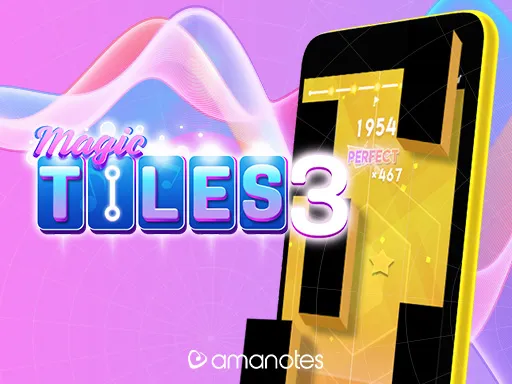
Magic Tiles 3



What Is Magic Tiles 3?
Magic Tiles 3 is a rhythm tapping game that turns a song into a fast reaction challenge. Tiles slide down the screen in lanes, and each correct tap plays the next note. If you miss a tile, tap the wrong one, or lose the timing, the run ends and the music stops. The core rule is simple: tap the black tiles to the beat and keep the melody going.
What makes Magic Tiles 3 so popular is how quickly it scales from easy to intense. Beginner tracks teach timing, focus, and control. Hard tracks demand sharp rhythm sense, quick hands, and calm decision making when patterns become crowded. You will also see long tiles that require a press and hold, plus moments where two tiles must be hit together.
Play Magic Tiles 3 in Your Browser
If you want instant access, you can play Magic Tiles 3 in your browser on fruitninjagame.org. This option is convenient because it helps you start quickly without installing anything. It is ideal for short breaks, quick practice, or a fast challenge when you want music gameplay on a laptop.
For the best experience, keep the game in the active tab and reduce distractions. Full screen mode can help you read lanes more clearly. If you are trying to improve, repeat the same song several times. This makes it easier to notice where you lose rhythm and where your hands tense up. Headphones can also help you hear the beat and the note changes more clearly.
How to Control Magic Tiles 3
Basic tapping on mouse, trackpad, or touch
In a browser, Magic Tiles 3 usually uses simple tap input. On a computer, click tiles as they reach the target area. On a phone or tablet, tap with your fingers. Your goal is not to tap early, and not to chase tiles too late. You want clean timing that matches the beat.
Hold notes and long tiles
Some tiles are long and require you to press and hold. A common mistake is releasing too early. Even if you start correctly, an early release counts as a miss and ends the run. Keep steady pressure and release at the end of the tile.
Double taps and two lane moments
As songs get harder, Magic Tiles 3 includes tiles that appear in two lanes at the same time. Use two fingers and tap together. A strong habit is to assign one finger to the left lanes and one finger to the right lanes. This reduces panic when the speed increases.
Reduce input delay
Rhythm games punish tiny delays. If your taps feel ignored, close extra tabs and heavy background apps. Keeping performance stable helps the timing feel fair and consistent.
Where Magic Tiles 3 Comes From
Magic Tiles 3 is widely known as a mobile music rhythm game built around tapping tiles to a beat. Over time, many versions of the game have emphasized a large song library, fast paced levels, and optional upgrades that unlock more content. Even when you play Magic Tiles 3 in a browser, the overall design still feels mobile friendly: quick sessions, clear rules, and immediate feedback.
How Scoring and Difficulty Work
Magic Tiles 3 rewards accuracy and consistency. Clean hits keep your streak alive, and mistakes break momentum. Difficulty rises through faster tempos, tighter spacing, and more complex patterns. Many songs also increase intensity near the end, which is where most players fail. Your hands get tired, the tiles arrive faster, and you start to tense up.
A helpful mindset is to treat each song like a performance. Your goal is not only to survive, but to stay smooth. When your taps are calm and controlled, Magic Tiles 3 feels slower and more readable.
Tips to Improve at Magic Tiles 3
Start with songs you can finish. Completing a run builds rhythm memory and teaches your hands how to relax. Once you can clear a track, replay it and aim to reduce small mistakes instead of chasing speed immediately.
Listen more than you look. The beat tells you what is coming next. When you follow the rhythm, your taps become automatic. Many players improve in Magic Tiles 3 when they treat tiles as timing markers rather than surprises.
Practice double taps on easier tracks. Place two fingers lightly and tap together, instead of hitting hard. For hold notes, focus on steady pressure and a clean release at the end. These small habits improve your results quickly.
If you hit a wall, take a short break and come back. In Magic Tiles 3, fatigue causes errors. A fresh mind often clears the same section more easily.
Common Questions About Magic Tiles 3
Is Magic Tiles 3 free to play?
Many versions of Magic Tiles 3 are free to start, and some include optional purchases or subscriptions that unlock extra songs or features.
Can I play Magic Tiles 3 offline?
Some versions allow offline play after songs are downloaded. Browser play usually requires a connection to load the game and audio smoothly.
Why does the song stop even when I feel like I tapped correctly?
In Magic Tiles 3, the run ends after a miss, a wrong tile, or an early release on a hold note. If it feels random, the cause is often input delay or performance lag. Closing heavy apps and keeping one active tab can help.
What should I do if Magic Tiles 3 feels laggy?
Try refreshing the page, closing extra tabs, and reducing background tasks. Also avoid heavy browser extensions while playing. Smooth performance makes timing more consistent.
Is Magic Tiles 3 good for kids?
Magic Tiles 3 trains timing, coordination, and focus. Many kids enjoy it, but adults should monitor any purchase prompts and keep play time balanced.
Play Magic Tiles 3 on fruitninjagame.org
If you want quick music action, play Magic Tiles 3 on fruitninjagame.org. Pick a song, tap with the beat, and try to beat your last score. With practice, Magic Tiles 3 becomes a satisfying loop of improving rhythm, sharper accuracy, and cleaner finishes.

Comments
Loading comments…